


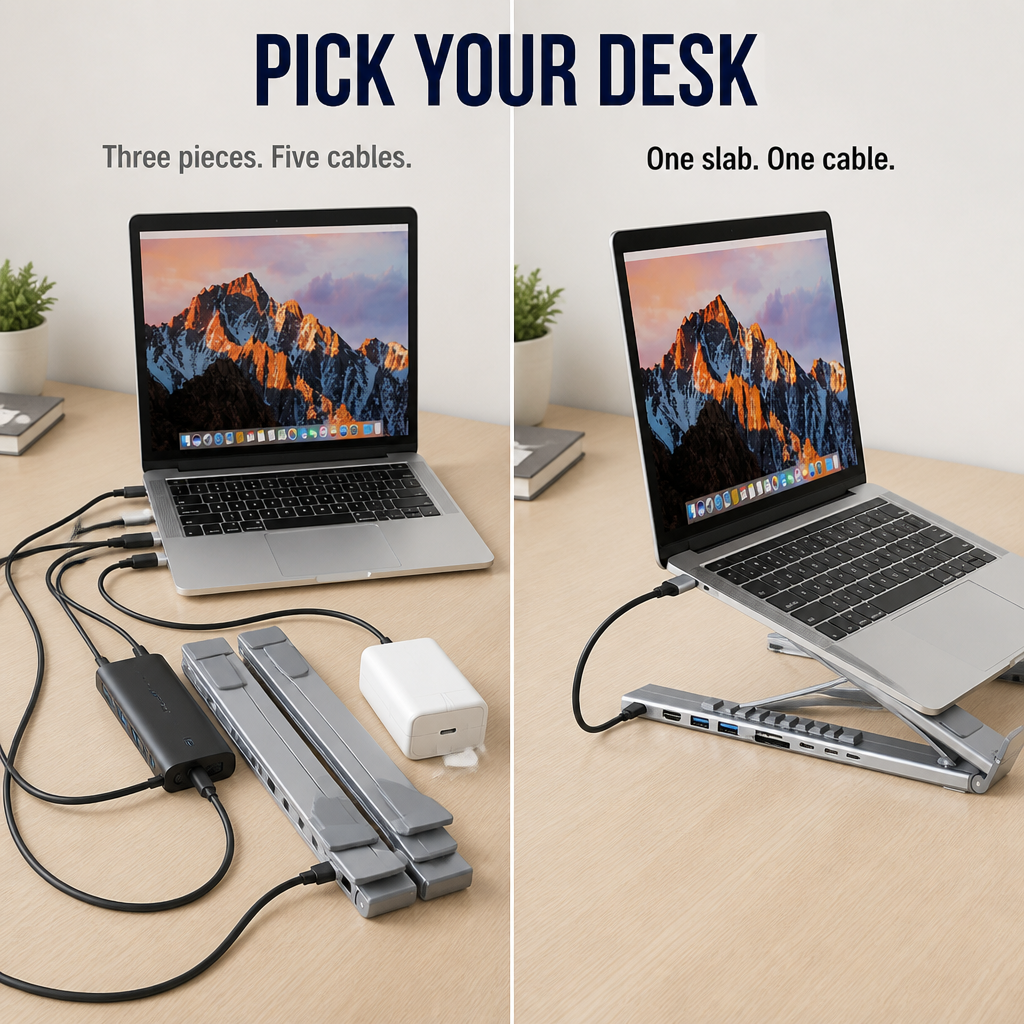


PowerPort Pro™ — Elevate Your Laptop, Charge 8 Devices, Fold Flat for Easy Carry
 High Quality
 Free US Shipping
 Hassle Free Returns
 Almost out of stock
Say Goodbye to Dongle Chaos — One Foldable Stand Elevates Your Laptop and Powers 8 Devices
For anyone using a MacBook or laptop with two USB-C ports and a drawer full of adapters, PowerPort Pro™ is the slab that clears up the clutter. Just one USB-C cable into your laptop. Eight ports coming out the back. Six locked height settings between your eyes and your keyboard. Fits any laptop or tablet between 10" and 17", supports up to 44 lbs, folds flat to fit in your bag.

Never Crawl Under Your Desk Just to Plug Something In Again
You switched to USB-C-only and got a new headache: dongle overload. One dongle for HDMI. Another for the SD card. A separate USB-A hub for your mouse. A brick just for charging. By mid-afternoon, your neck protests because the screen sits too low. The fix isn't another adapter. It's one slab that lifts, ports, and delivers 100W charging — then folds flat when it’s time to go.
➤ Connect 8 Devices Via One Slab, No More Dongle Drawer: 4K HDMI, two USB-A 3.0, USB-C data, SD, TF, and 100W USB-C PD — all ports seamlessly integrated into the slab your laptop rests on.
➤ Set Your Screen at Eye Level with Six Clicked Heights: Aluminum hinges lock into six positions. Perfectly align with your chair, ditch the hunch, spare your neck for workouts.
➤ Fold Flat and Toss into Your Bag: Collapses to about the size of a paperback. Includes carry pouch and USB-C cable. Ready to work in a café under 10 seconds.

Introducing PowerPort Pro™ — One Aluminum Slab That Combines Three Devices
It’s a laptop stand. It’s an 8-port dock. It’s a 100W charging passthrough. Wrapped up in a single folded aluminum piece that sits between your laptop and desk. One USB-C cable links everything to your device. Unplug it, fold the slab, and take it with you.
The aluminum frame is the backbone — supporting 44 lbs of laptop weight and locking into six stable height positions without any wobble. Ports run along the rear edge: HDMI 4K@30Hz, two USB-A 3.0 (5Gbps each), a USB-C data port (5Gbps), SD and TF card slots, plus a USB-C PD input rated for 100W rapid charging on a 16" MacBook Pro, iPad, Switch, or smartphone.

Why Home Office Pros and Creators Are Ditching Dongle Drawers for PowerPort Pro™
Reviews tell the same story: folks start with a hub, a separate stand, and a 100W charger brick. Soon they tire of cables sprawling everywhere and the screen remaining too low. One slab, one cable in, eight ports out — and finally, your neck stays happy.
"I’d been using a hub, a stand, and a charger brick. Now my entire desk is just a slab and a cable. The 100W on a 16" MacBook? Legit — no dimming, no fan freak-out." — Marcus K.
"Three weeks in and that 3pm neck ache stopped. Didn’t expect that from a USB-C hub." — Priya S.

One Cable In. Eight Ports Out. No More Neck Grumbles.
✓ One USB-C In, Eight Ports Out: Just one cable connects the slab to your laptop. Tangled wires behind your monitor vanish. Mouse, keyboard, display, drive, SD card, charger — all accessed through the slab.
✓ Six Locked Heights to Match Your Seat: Click into the perfect angle to keep your neck comfortable from morning emails to evening calls. No leaning forward, no makeshift risers, no stack of books required.
✓ Genuine 100W Power + 5Gbps Data Together: Charge a 16" MacBook Pro fast while transferring 4K video to an SSD. No need to choose between speed and power.
Set Up in Three Simple Steps, Then Forget About It
Step 1: Unfold the aluminum stand, click it into one of six height settings, place your laptop on it.
Step 2: Connect the included USB-C cable from the slab to your laptop. That's the sole connection needed.
Step 3: Plug in your monitor, mouse, drive, charger, and SD card on the slab’s rear ports. Step away. Your workstation is ready for the day.

| PowerPort Pro™ | Separate Dongles & Hub | Plain Laptop Stand |
|---|---|---|
| ✅ 8 ports + stand combined in one aluminum slab | ❌ 3–5 separate adapters tangled behind your monitor | ❌ Raises the laptop. Does nothing beyond that. |
| ✅ Six secured height settings, supports 44 lbs | ❌ Laptop remains flat — your neck pays the cost | ✅ Adjustable height, but zero ports |
| ✅ 100W charging + 5Gbps data via one cable | ❌ Budget hubs max out at 60W or throttle data rate | ❌ No power, no data — just a stand |
Full Specifications for the Detail-Oriented
- Type: 8-in-1 USB-C Docking Laptop Stand
- Ports: HDMI 4K@30Hz, 2× USB-A 3.0 (5Gbps), 1× USB-C data (5Gbps), 1× USB-C PD input (100W), 1× SD card, 1× TF/microSD card, 1× USB-C host to laptop
- Material: Aluminum alloy
- Color: Silver
- Laptop/Tablet size: Fits 10" to 17"
- Max load: 44 lbs (20 kg)
- Height settings: 6 locked positions, foldable flat
- Includes: 1× PowerPort Pro™ Stand Hub, 1× USB-C cable, 1× carry pouch
Answers to the Questions You're About to Google Anyway
Will it work with my MacBook? My Windows laptop? My iPad?
Yes to all three, provided your device has a USB-C port supporting display output and power delivery. Compatible with M-series MacBooks, USB-C Windows laptops (XPS, ThinkPad, Surface), iPad Pro/Air with USB-C, and most modern Android tablets.
Can it truly fast-charge a 16" MacBook Pro?
Yes — connect a 100W USB-C charger to the PD input and enjoy full-speed charging on a 16" MacBook Pro, plus simultaneous data and display on other ports with no dimming or throttling.
Is the stand stable when typing directly on the laptop?
The aluminum hinges lock firmly at each height setting — no flex, no wobble during normal typing. Rated to hold 44 lbs, so a 16" MacBook Pro or a Surface plus a tablet is comfortably supported.
Will my laptop overheat sitting on it?
Quite the opposite — the open design lifts your laptop off the desk, allowing air to flow underneath. Most users notice quieter fans compared to flat desk placement.
Does it fold small enough for travel?
Yes — folds flat to about the size of a paperback and comes with a carry pouch. Fits neatly in your laptop bag beside your device. Set it up at a café in under 10 seconds.

Try It Out on Your Desk for 30 Days — Or Return It
If PowerPort Pro™ doesn’t clear your dongle clutter and silence your 3pm neck ache within 30 days, return it for a full refund — no restocking fee, no questions asked. The slab must earn its spot on your desk. If it falls short, you owe nothing.
What our customers have to say:
Luvilea Guarantees


Rated 4.6 / 5 based on 1289 reviews. Showing our 4 and 5-star reviews.